Dekad Enterprise Book: CRM

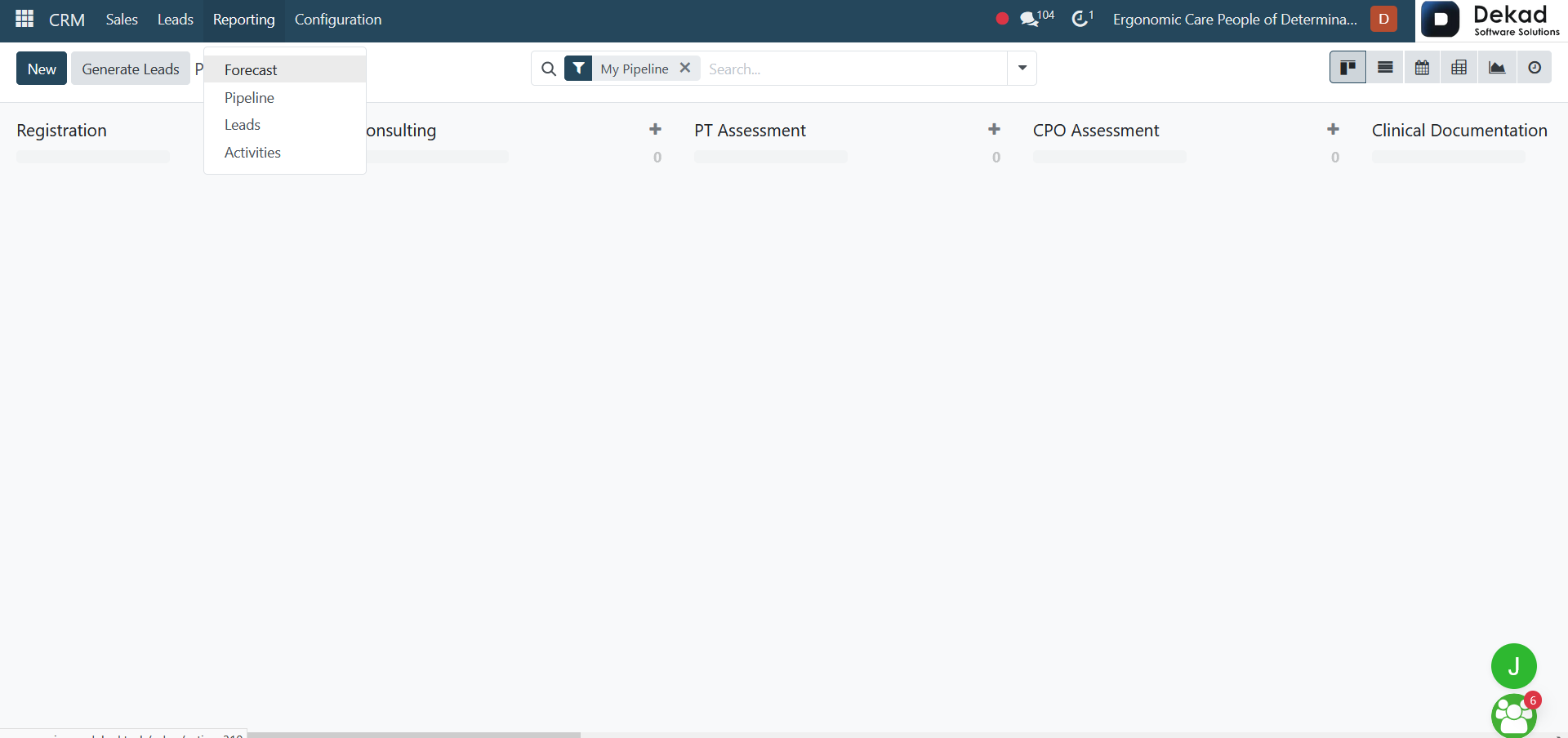
4. Reporting

The Reporting section provides users with a comprehensive overview of CRM performance through several reporting tools, including Forecast, Pipeline, Leads, and Activities reports. These reports help users analyze sales performance, monitor lead and opportunity progress, track scheduled activities, and evaluate future sales expectations. By using these reporting features, organizations can gain valuable insights and make data-driven decisions to improve their sales processes.

4.1 Forecast

The Forecast report provides users with an overview of expected sales performance based on current opportunities and pipeline data. It helps sales teams estimate future revenue, monitor potential sales outcomes, and evaluate progress toward sales targets. By analyzing forecast data, users can identify upcoming opportunities, assess business expectations, and make informed decisions to support sales planning and resource allocation.

dekad

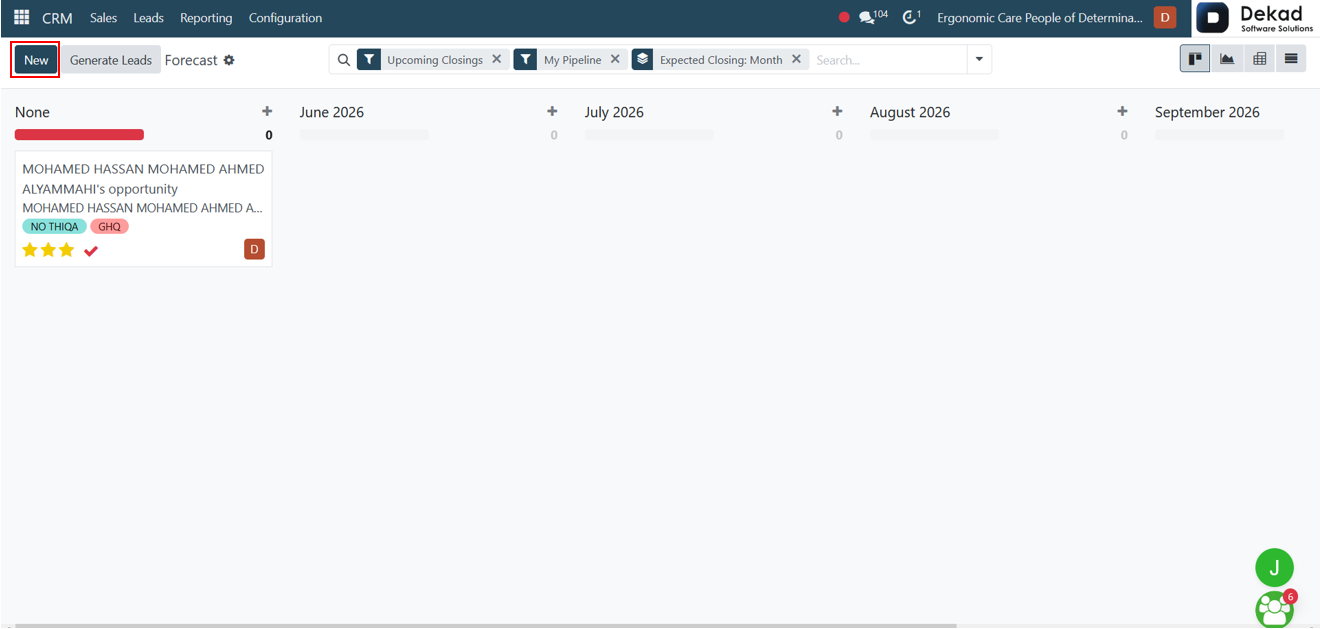
The Forecast page displays sales opportunities organized by their expected closing periods. Users can use the available filters, including Upcoming Closings, My Pipeline, and Expected Closing, to refine the displayed data. A search feature is also available to quickly locate specific opportunities. The forecast is grouped by month, allowing users to view and manage opportunities according to their expected closing dates.
dekad

The Generate Leads button allows users to create lead generation requests and add new potential leads to the CRM system based on selected criteria.

dekad

The New button allows users to create a new opportunity and add it to the sales pipeline.

dekad

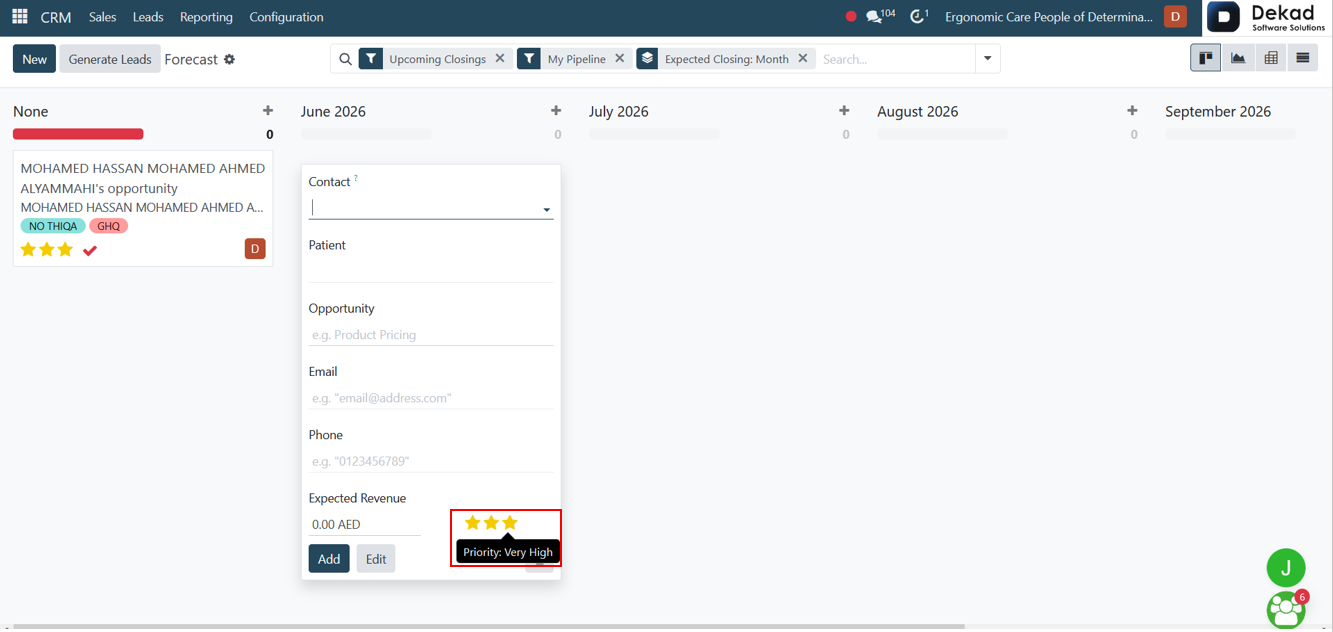
After clicking the New button, users can create a new opportunity by entering the required information, including the Contact, Opportunity name, Email, Phone Number, and Expected Revenue. The opportunity is automatically placed within the forecast period corresponding to its expected closing date, allowing users to organize and track opportunities according to the relevant forecasting timeline. Users can also assign a priority level using the star rating system, helping sales teams identify and focus on more important opportunities. Additionally, the Add and Edit options can be used to manage opportunity details as needed.
dekad

The Contact can be selected from existing records in the system, or a new contact can be created if the required record is not available.

dekad

The Patient can be selected from existing records in the system, or a new patient can be created if the required record is not available.

dekad

Priority Levels


Medium Priority indicates a standard opportunity that requires regular follow-up and attention as part of the normal sales process.

dekad

High Priority indicates an important opportunity that should receive increased attention due to its potential value or urgency.

dekad

Very High Priority indicates a critical opportunity that requires immediate attention and close monitoring to maximize the chances of a successful outcome.

dekad

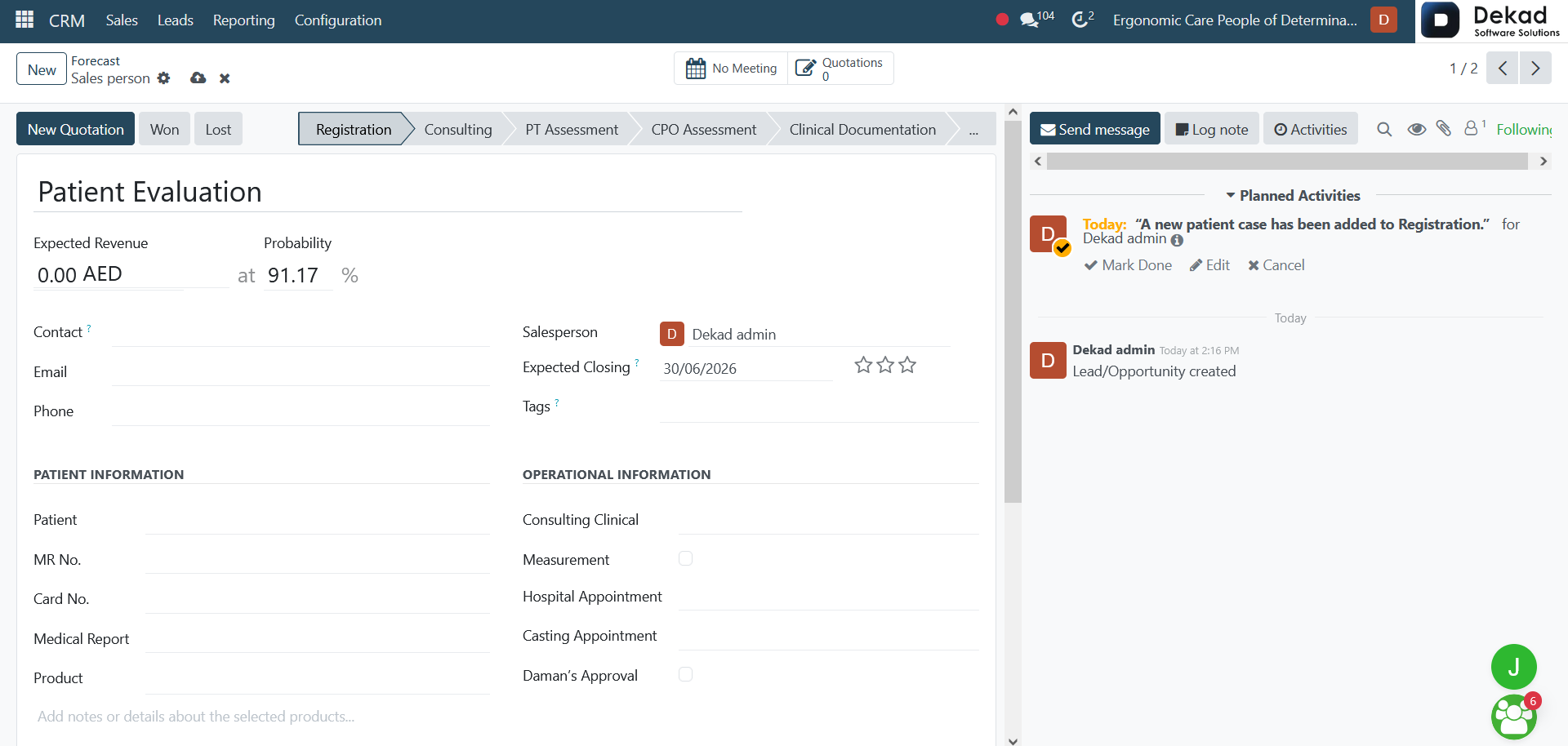
After opening an opportunity in Edit mode, users can view and update detailed information related to the opportunity. The form includes fields such as Expected Revenue, Probability, Contact Information, Patient Information, Product Details, Salesperson, Expected Closing Date, and Tags.

Additional information can be recorded in dedicated sections, including patient records, medical details, quotations, assessments, and operational information. Users can also track the progress of the opportunity through different stages and update relevant details as the sales process advances.
dekad

The Extra Information section allows users to store additional details related to the opportunity. This includes company and contact information such as Company Name, Address, Website, Contact Name, Job Position, and Mobile Number.

The section also contains Marketing fields, including Campaign, Medium, Source, and Referred By, which help track how the opportunity was acquired. In addition, the Tracking area provides information related to the opportunity's management, such as the associated Company, Sales Team, Days to Assign, and Days to Close, supporting better monitoring and analysis of the sales process.
dekad

The Internal Notes section allows users to record additional comments, observations, and important information related to the opportunity. These notes are used internally by the sales team to improve communication and ensure that all relevant details are documented throughout the sales process.

dekad

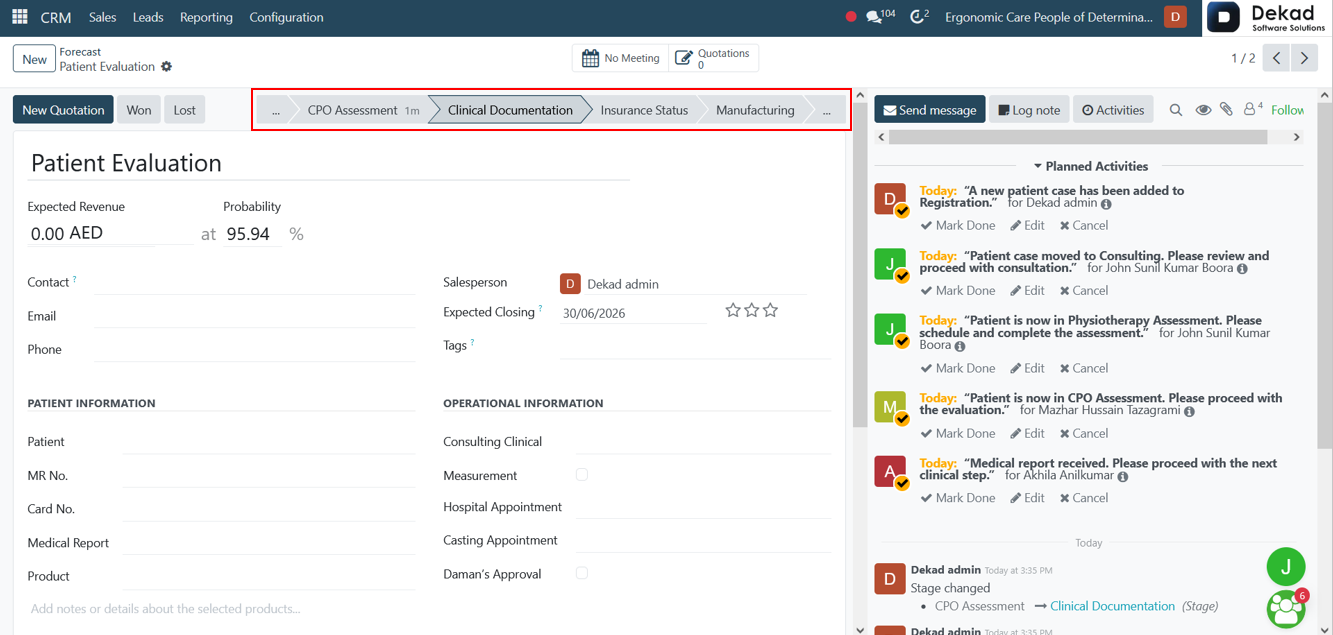
These represent different stages in the process where the opportunity or case progresses through specific workflow steps such as assessment, documentation, insurance handling, and production-related activities. Each stage reflects a different part of the overall operational flow within the system.

dekad

Chatter Panel

The chatter panel provides an overview of expected sales opportunities and their projected closing timelines. Users can view and analyze opportunities based on their expected closing periods, apply available filters, and monitor pipeline performance. It displays relevant updates and changes related to opportunities, allowing users to track expected revenue and sales progress. Each update is shown with the related user activity, supporting better visibility, tracking, and decision-making throughout the sales forecasting process.

dekad

Won & Lost

The Won and Lost statuses represent the final outcome of an opportunity. Won indicates that the opportunity has been successfully completed and converted, while Lost indicates that the opportunity was not successful. These statuses help track the final result of each opportunity and support analysis of sales performance and conversion effectiveness.

dekad

4.2 Pipeline

The Pipeline represents the flow of opportunities as they move through different stages of the sales process. It provides a visual overview of all ongoing opportunities, allowing users to track their progress from initial entry until they are either won or lost.

dekad

The Pipeline Analysis provides a visual representation of how opportunities move through different stages within the sales process. It allows users to clearly see the progression of each opportunity from one stage to the next in a structured flow. This view helps in understanding the current status of opportunities, tracking their movement across stages, and identifying where each opportunity stands in the overall pipeline.

dekad

4.3 Leads

The Leads section contains all potential customers who have shown interest in the company’s products or services but have not yet been qualified as opportunities. It provides a centralized view for managing and tracking initial contacts within the sales process.

dekad

The Leads Analysis report provides a detailed overview of all leads within the system, allowing users to evaluate lead performance and conversion efficiency. It helps in analyzing key metrics such as lead sources, stages, and outcomes, enabling better understanding of how leads are generated and processed. This view supports data-driven decision-making by highlighting trends and patterns in lead management.

dekad

4.4 Activities

The Activities section provides users with an overview of all scheduled and completed tasks related to leads and opportunities. It helps organize follow-up actions such as calls, meetings, and reminders, ensuring that no important activity is missed. This view supports better time management and improves the efficiency of the sales process by keeping all planned activities visible and well-structured.

dekad

The Activities view displays all scheduled activities organized by time, showing a clear monthly overview. Each month is represented with a visual indicator that highlights the number of activities planned or assigned during that period. The blue sections provide a quick summary of activity distribution across different months, helping users easily track workload, plan follow-ups, and manage time more effectively.

dekad